Family Manager
Overview
Family Manager is a modeless tool to manage families in bulk, launched from the Library side rail. It works across loadable families, system types, model groups, and assemblies (per tab), organized into five tabs: Rename, Parameters, Export, Remove Host, and Unlock Parameters. You stage your edits in the UI and apply them family by family with a best-effort report — one failed family never aborts the batch.
Rename
Accumulative staging: the New Name column starts equal to the current name, and rules no longer auto-apply on keystroke. Bake a Find/Replace or a prefix/suffix/casing rule over all visible rows or just your selection, stack as many passes as you like, and undo/redo the draft before committing. Swap renames (A→B while B→A) are handled with a two-phase pass. Works on loadable families, system families, model groups, and assemblies, scoped to the whole model, the active view, or a selection.
Parameters
For the checked families, stage three operation kinds: Add a shared parameter from your shared-parameter file into a chosen group as Instance or Type; Remove a parameter by name; or Convert an existing parameter's binding between Instance and Type. Each family is opened once, all its staged ops run in one transaction, and it is reloaded into the project.
Export
Write the checked families to .rfa on disk, optionally into per-category subfolders. An existing file is skipped (not an error) unless you allow overwrite; in-place and non-editable families are reported as warnings.
Remove Host
Convert hosted families to face-based, dropping their host dependency. Choose Replace-in-place (requires zero placed instances) or Save-as-copy (a sandbox round-trip that produces a new .rfa), with an optional naming rule and export folder. A 14-category eligibility check gates the list; if instances appear before apply, Replace-in-place falls back to Save-as-copy rather than failing.
Unlock Parameters
Batch-clear the formulas that lock family parameters, choosing per parameter whether to keep, clear, or set the value. See the Unlock Family Parameters page for the full flow.
How to use
- Open the Library pane and launch Family Manager from the side rail.
- Pick a tab, then narrow the list with the multi-category filter and the search box.
- Rename — stage Find/Replace, prefix/suffix, and casing rules into the editable New Name column; bake a rule over all visible rows or just your grid selection, stack passes, and undo/redo before you commit.
- Parameters — for the checked families, stage Add (a shared parameter into a chosen group, as Instance or Type), Remove (by name), or Convert (flip an existing parameter's binding between Instance and Type).
- Export — write the checked families to .rfa on disk, optionally into per-category subfolders.
- Remove Host — convert hosted families to face-based, dropping the host dependency via Replace-in-place or a safe Save-as-copy sandbox round-trip.
- Apply — changes run family by family; review the report of what succeeded and what was skipped.
Screenshots
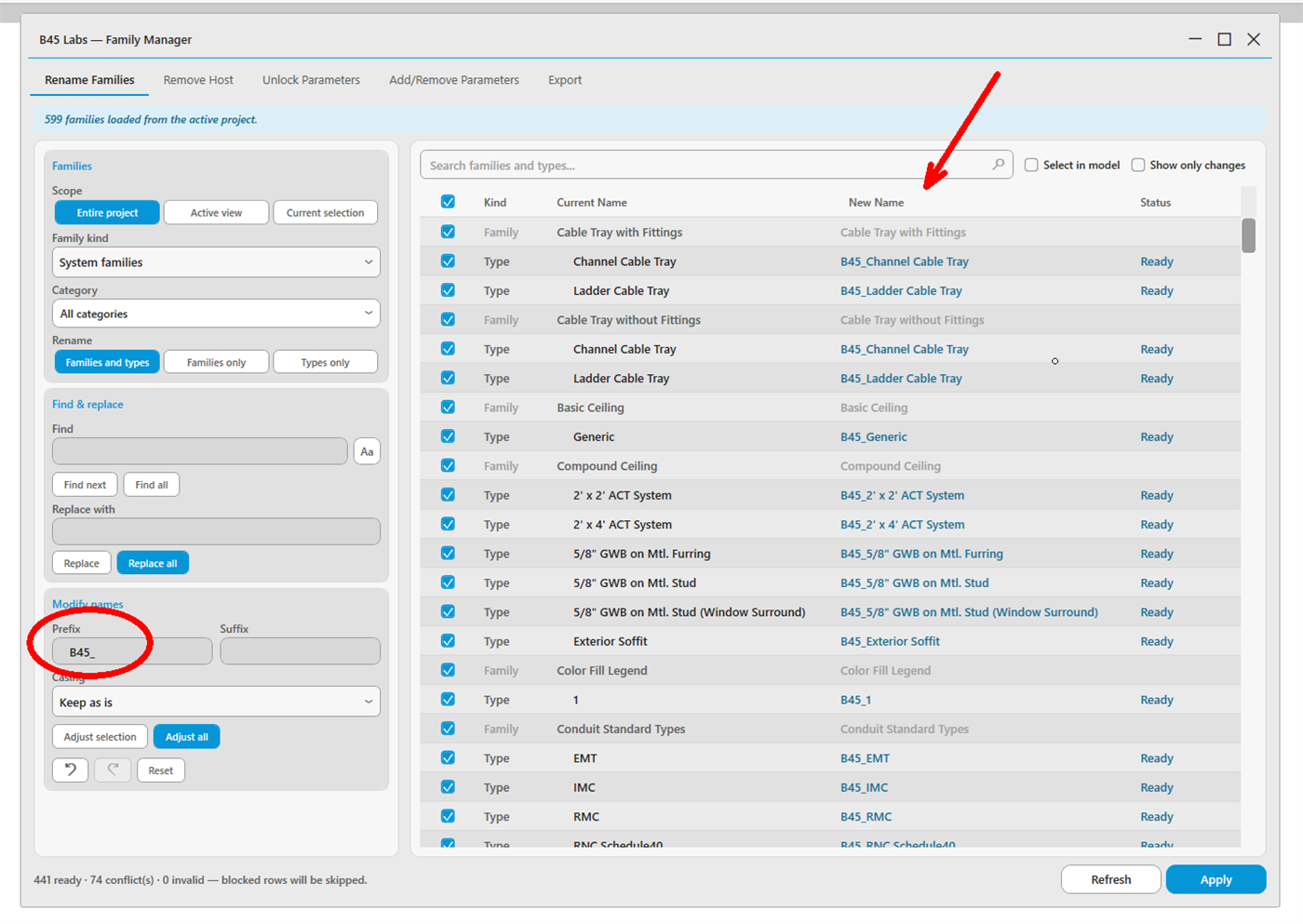
Rename Families tab: staged Find/Replace and prefix/suffix rules
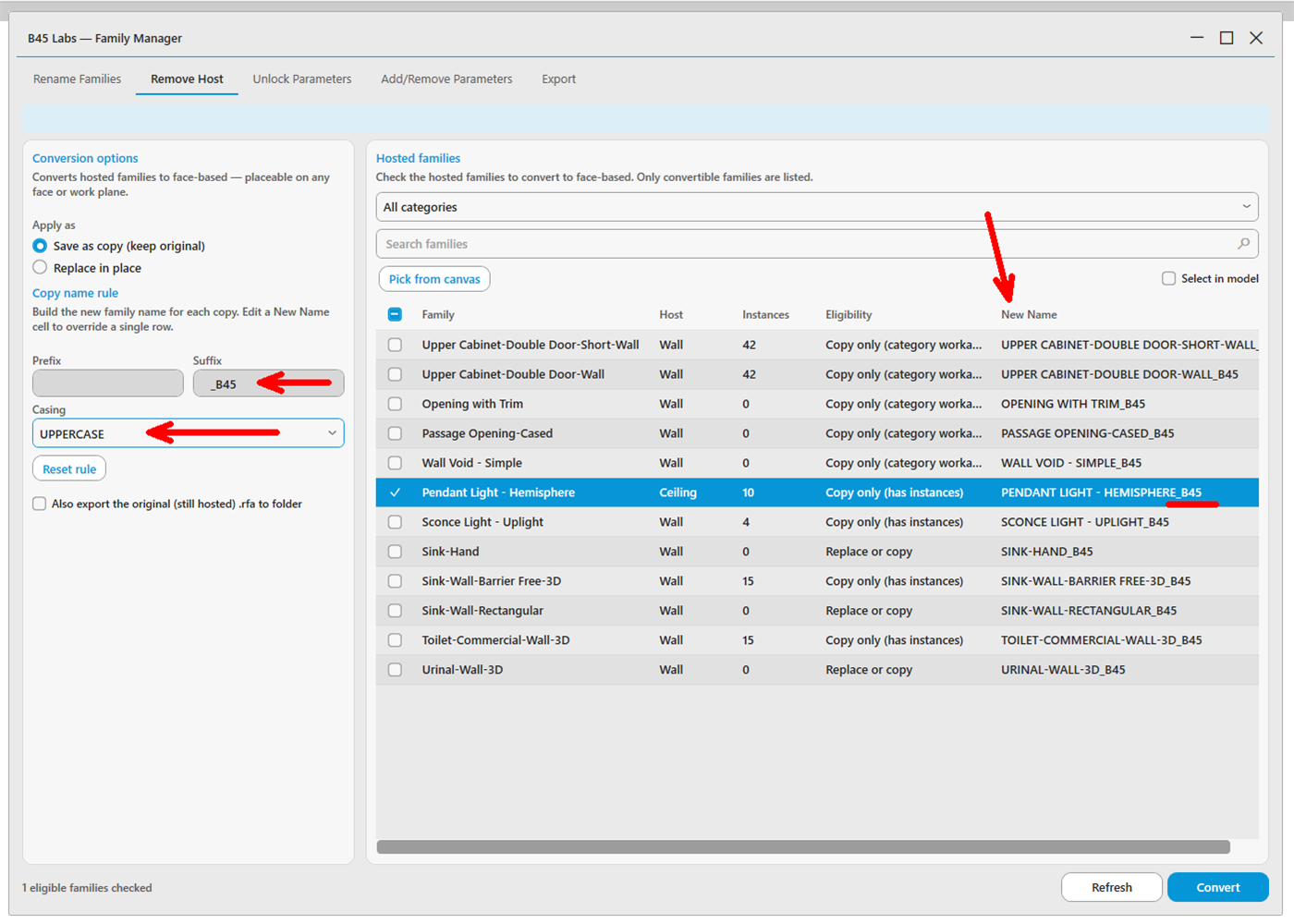
Remove Host tab: convert hosted families to face-based
Tips & Notes
- Right-click menus, multi-select, select-in-model, and pick-from-canvas work throughout.
- Use the multi-category filter to narrow long family lists before staging actions.
- Validation blocks only the conflicting or invalid rows — the rest of the batch stays appliable.
- All five Family Manager actions end in a completion notification carrying its count, so a batch that ran over many families tells you how many it touched without you counting rows.
Limitations
- In-place families and non-editable families are excluded from the session.
- System-family names (e.g. "Basic Wall") cannot be renamed — only their individual types can.